
Welcome to FreeRide#

FreeRide is a Python package designed specifically for introductory microeconomics. Built with simplicity in mind, it provides intuitive tools for modeling economic concepts that “just work” the way economics students expect them to.
🎯 Designed for Economics 101
Every feature is crafted with introductory economics in mind. The focus is on simple cases, like linear or piecewise-linear demand curves, that illustrate key concepts.
✨ Intuitive by Design
Clean, readable code that matches conventional notation. Operations like a + b
for demand curves naturally perform horizontal summation.
📊 Learn Visually
Plotting capabilities are emphasized. Every plot looks like it belongs in an economics textbook. Clean axes, automatic equilibrium highlighting, and thoughtful styling make your analysis shine.
Installation#
Install FreeRide using pip:
pip install freeride
Where to run this:
Mac: Open Terminal (found in Applications → Utilities)
Windows: Open Command Prompt (search “cmd” in Start menu)
Both: Or use Anaconda Prompt if you have Anaconda installed
New to Python? We recommend starting with Google Colab,
which provides a free Python environment in your browser. No installation required - just run
!pip install freeride in a code cell.
Quick Example#
from freeride import Demand, Supply

# Create supply and demand curves
demand = Demand.from_formula("Q = 20 - 2*P")
supply = Supply.from_formula("Q = -5 + 3*P")

# Find equilibrium using the intersection operator
market = demand & supply

# Beautiful plot with shaded surplus
market.plot(surplus=True)

# Inspect the equilibrium
print(market)  # shows price and quantity
print(market.consumer_surplus)
print(market.producer_surplus)
Output:
Market(price=5.0, quantity=10.0)
25.0
37.5
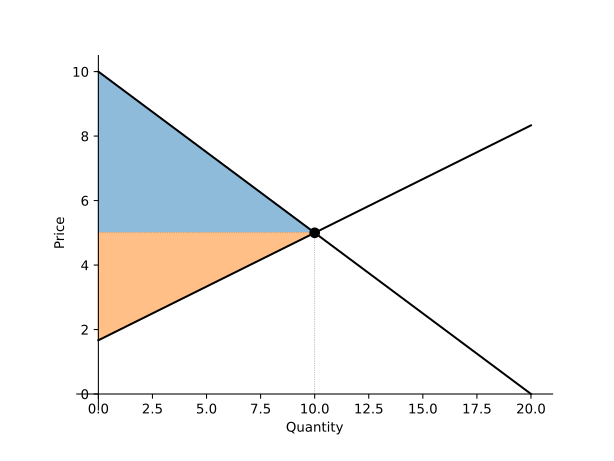
The plot shows the supply and demand curves with the equilibrium point clearly marked, and the consumer and producer surplus areas shaded:
Basic Tax Example#
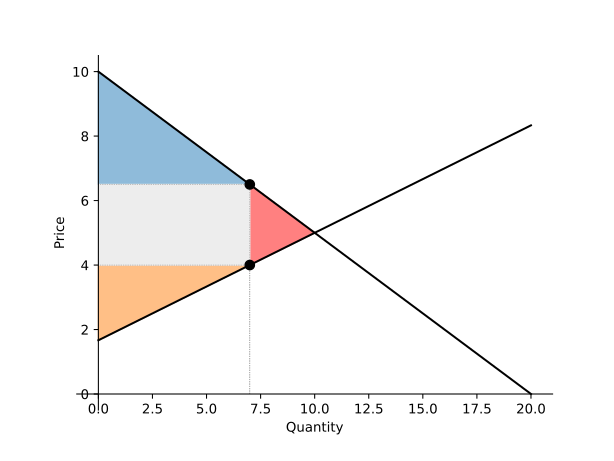
We can easily add a tax to the market and visualize its effects.
# Apply a $2.50 tax
market.tax = 2.5
market.plot(surplus=True)
This plot shows the higher price paid by consumers, the lower price received by producers, and the shaded tax revenue rectangle.
Contents